How to know what agents are visiting your website
By Wendy Harris·1 June 2026·7 minute read

The most common response I get when I tell someone in the visitor economy that AI agents are already visiting their website is: "Really? I don't see that in my analytics."
And they are right. They do not see it. That is the whole problem.
If Google Analytics is your primary window onto your website traffic, you are watching one screen while most of the interesting activity is happening on another. Not because something is broken, and not because you have set anything up wrongly. It is just how web analytics works, and it has a gap in it that has always existed but now matters a great deal more than it used to.
Here is the basic thing to understand. Google Analytics works by running a small piece of code inside the visitor's browser. When a person loads your website in Chrome or Safari, the code fires, records the visit, and sends the data back. The key word there is browser. A human uses a browser. A bot usually does not.
A bot is simply an automated programme that visits websites without a human in the loop. The name comes from robot, and that is a fair way to think about it. Some are old and familiar. Googlebot has been crawling websites since the early days of the web, and without it you would not appear in search results at all. The thing to hold on to is that most bots do not use a browser, which is exactly why your analytics cannot see them.
When an AI agent visits your website, it sends a request directly to your server, downloads the page content, and leaves. No browser. No JavaScript. No tracking code firing. Google Analytics never sees the visit.
Google Analytics does filter out some known bots automatically, using a list maintained by an advertising industry body (the IAB Tech Lab and ABC's International Spiders and Bots List). Googlebot is on that list. Bingbot is on it too. But the list has not kept pace with the number of new AI crawlers that have appeared in the last couple of years. Many of the most significant agents visiting your site right now are completely invisible to your analytics dashboard.
This is not a flaw you can fix in Google Analytics settings. It is a fundamental limitation of how client-side tracking works. To see what is actually arriving at your server, you need something that sits at the server level.
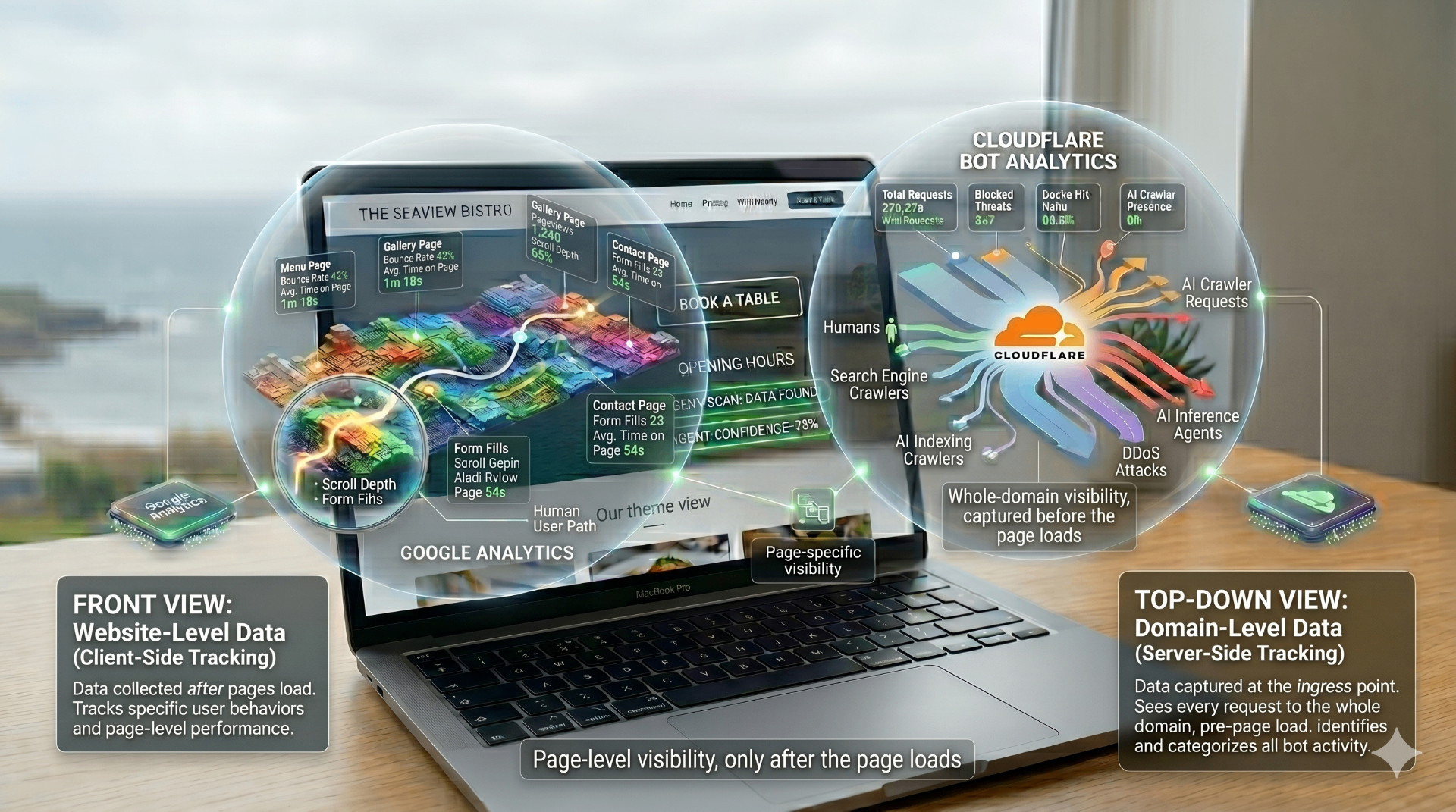
Image generated by Google Gemini Flash
A new generation of visitor
What has changed is who is sending bots, and what they are trying to do with what they find. Older crawlers like Googlebot exist to index your site for a search result. The new generation of AI crawlers is visiting to read and understand your site, so that an AI system can answer questions about your business. The companies behind ChatGPT, Claude, Perplexity, and Apple Intelligence all send their own crawlers. They are building the knowledge their systems draw on when someone asks where to stay, eat, or visit. They are reading your content in order to represent your business to the people doing the asking. If they find something out of date, they represent that instead.
Cloudflare, which processes a significant portion of internet traffic globally, has been tracking this activity. One figure worth knowing: GPTBot, sent by OpenAI, grew its crawl volume by more than 300% in a single year between 2024 and 2025. ClaudeBot, sent by Anthropic, has been growing quickly too. These are not occasional visits. They are regular, systematic, and they are happening whether or not you can see them.
The tool that can see them
The tool I recommend for getting visibility on this is Cloudflare, and there is an irony worth naming up front. Cloudflare is the company working hardest to put AI crawlers behind a gate, and that is precisely why its view of them is so good. Most people know Cloudflare as a security and performance layer, something that sits in front of your website and protects it. That is accurate, and it also means Cloudflare sees everything that arrives at your domain before any JavaScript runs. Humans, bots, AI crawlers, everything.
Its Bot Analytics dashboard shows you which bots are visiting, how often, and which pages they are interested in. Its AI Crawl Control feature goes further and lets you see AI crawlers specifically, broken down by name, with data on how often they visit and whether they are following your robots.txt rules.
A note on robots.txt: this is a file that lives on your website and tells bots what they are and are not allowed to access. Think of it as a sign on the door. If you have never checked yours, it is worth a look. It lives at yourwebsite.com/robots.txt. Some websites have robots.txt files that are accidentally blocking the very AI crawlers the business would want to visit.
If you are not already on Cloudflare, the free plan covers the AI crawler analytics and is genuinely useful. Setup means adding your domain to Cloudflare and pointing your nameservers at it, a one-off job for whoever manages your site. It is usually quick, but make sure they carry across all your existing DNS records first, especially the email ones, so nothing breaks in the move. If you are not sure whether your site is already using Cloudflare, ask whoever manages your hosting.
The one setting you must check
There is one setting that matters more than anything else in this article. Since July 2025, Cloudflare blocks known AI crawlers by default on every new domain added to its network. So the very act of setting up Cloudflare, the thing I have just recommended, can quietly switch off access for the agents you want reading your site. Existing domains can end up with the block enabled too, sometimes through a routine settings change or dashboard update. So whether you are new to Cloudflare or have been on it for years, go into the AI crawler controls and confirm that the agents you want, the crawlers behind ChatGPT, Claude, Perplexity, and the rest, are allowed in.
Blocking them is the right call for some businesses, particularly publishers protecting paid content. For most in the visitor economy, where the whole goal is to be found and recommended, blocking is the opposite of what you are trying to do.
Once everything is in place, Bot Analytics lives in the security section of your Cloudflare dashboard. AI Crawl Control is the part designed to give you a breakdown of AI agent activity, and it is also where those allow and block controls live.
What the data is actually for
The reason I find this data useful is not to slam the door. Most of the time, you want these crawlers to visit. You want them to find your content, read it, and describe your business accurately to the people asking AI systems where to stay. The point of understanding which agents are visiting is the same as the point of understanding any traffic: knowing what is happening is the starting point for doing something about it.
There is a phrase I use a lot in conversations about glassmark: if AI cannot understand your website, your customers probably cannot either.
The bot traffic question is the other side of that. If you do not know which AI systems are reaching your website, you do not know whether they are finding what they need. And if what they find is incomplete, out of date, or ambiguous, that is what they will use to describe you.
The visitor economy is full of businesses with excellent reputations and genuinely good things to offer. The ones that come out of this shift in the best position will be those that can answer yes to two questions: do the right agents have access to my website, and when they get there, do they find information that is accurate and complete? The first question you can start answering today, by checking your Cloudflare settings. The second is what a glassmark scan is for.
Read more
- Cloudflare AI Crawl Control overview
- How to detect AI crawlers (Cloudflare Learning Centre)
- The crawl-to-click gap: Cloudflare data on AI bots and referrals
- A deeper look at AI crawler traffic by industry
- How to track AI traffic in Google Analytics 4 (and why GA4 misses most of it)
See what AI sees. Free scan at glassmark.ai, no developer required.
Run your free scan